Have you ever wasted precious minutes digging through three different group chats just to find a single photo, receipt, or web link? WhatsApp knows this is a headache, and they are finally working on a smart fix.
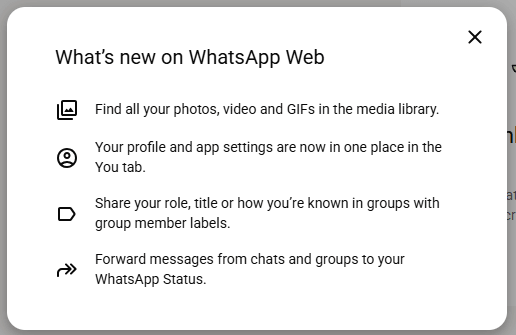
The app is currently developing a new section called the Centralized Media Hub. This clean dashboard will gather every single picture, video, and document sent across all your different chats and show them to you on one single screen.
What is the New WhatsApp Media Hub?
Think of the Media Hub as a giant, organized photo album for your entire WhatsApp account. Instead of opening a specific person’s profile to see what they sent you, you can open this hub to see a complete timeline of every file you have received or sent recently.
The Best Parts of This Update:
- One-Click Sidebar Button: A new icon is being added straight to the main menu bar, so you can jump into your media collection instantly.
- Smart Search Bars: You can quickly find a file by typing the name of the friend who sent it, or by searching for words written in the image caption.
- Bulk Delete Option: Cleaning up your phone is about to get much faster. You can select multiple heavy videos or files at the same time and delete them all in one go.
- Sort by Largest Files: If your phone storage is full, you can tell the hub to show you the biggest files first so you can clear up gigabytes of space in seconds.
Step-by-Step: How to Check and Use the Feature
Note: This feature is rolling out slowly to testers first, starting with WhatsApp Web and the Desktop apps.
Once the update lands on your app, here is how you can use it:
- Open WhatsApp: Fire up WhatsApp on your computer or laptop.
- Click the Hub Icon: Look at the left-side menu panel and click the brand-new Media Hub icon.
- Pick Your Category: Switch between tabs like “Photos/Videos”, “Documents”, or “Links” depending on what you are looking for.
- Search and Filter: Use the top search bar if you want to see files from just one specific contact.
- Clean Up Space: To delete items, turn on the multi-select tool, check the boxes next to the unwanted files, and click the trash icon.
FAQs on WhatsApp all media in one place
Q1: Will this feature show pictures from my locked or private chats? Ans: No. WhatsApp keeps your private chats locked tight. Media from your hidden or biometric-locked chats will stay completely safe and will not pop up in this main media feed.
Q2: Can I use this to delete files and save phone storage? Ans: Yes! This is one of the best uses for it. You can easily find the heaviest videos from all your chats combined and erase them instantly to free up space on your device.
Q3: When will this feature come to Android phones and iPhones? Ans: It is currently being tested on the desktop and web versions of WhatsApp. Once the company fixes any bugs and ensures it runs smoothly, it will launch on mobile apps for everyone.

Maria Jain is a Senior Content Strategist and Tech Editor at Digital Web Services, with over 6+ years of experience covering digital marketing, website development, and search engine optimization. She specializes in WordPress site architecture, AI technologies, Web Hosting, topical authority models, and hands-on SaaS & affiliate tool reviews. Maria combines data-driven SEO practices with deep web design and technical insights to publish transparent guides, tool comparisons, and strategic tutorials for digital growth.