

KWFinder is a keyword research tool created by Mangools. It helps you find long-tail keywords with low competition and gives you accurate metrics that guide smarter SEO decisions. It’s built for website owners, bloggers, content creators, agencies, and anyone wanting more organic traffic without getting lost in complex dashboards.

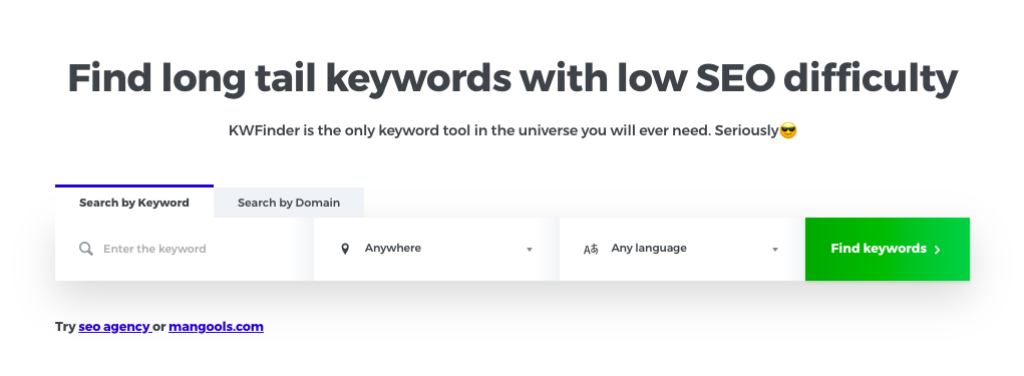
You can use it to:
- Discover low-competition keywords
- Track search trends
- Analyze competitors
- Check SERP strength
- Research keywords for both SEO and PPC
- Target keywords based on location
KWFinder is bundled with the full Mangools suite, which includes SERPChecker, SERPWatcher, LinkMiner, and SiteProfiler.


KWFinder Review: Is It Still the Best Keyword Research Tool?
KWFinder has been a favorite among bloggers, marketers, and small business owners for years. It stands out for its clean interface, quick results, and highly accurate keyword difficulty scores. As part of the Mangools SEO toolkit, it helps you uncover long-tail keywords, analyze competitors, track rankings, and understand SERP data with ease.
If you’re deciding whether KWFinder is the right tool for your SEO work in 2026, this updated review will walk you through everything that matters.
KWFinder Key Features
1. Accurate Keyword Difficulty (KD) Score
KWFinder assigns a difficulty score from 0 to 100. This shows how hard it is to rank for a keyword based on real Google SERP data. The accuracy of this score is one of the tool’s biggest strengths.
You’ll also see:
- Monthly search volume
- CPC
- PPC competition
- Trend charts
These insights help you judge how valuable a keyword really is.
2. Long-Tail Keyword Finder
KWFinder excels at uncovering keywords that bigger tools often overlook. You get:
- Related keywords
- Autocomplete suggestions
- Question-based keywords
This makes content planning much easier, especially for niches with lots of topics.
3. Competitor Keyword Analysis
You can enter a domain and see which keywords your competitors rank for, including:
- Search positions
- Estimated visits
- Keyword difficulty
This helps you spot gaps and opportunities you can target next.
4. Local SEO Capabilities
If your business targets specific cities or regions, KWFinder offers local keyword data for over 50,000 locations worldwide. You can filter results by:
- Country
- State
- City
- Language
Great for local service businesses, agencies, and franchises.
5. SERP Analysis
Each keyword includes a live view of the top-ranking pages with details like:
- Domain Authority (DA)
- Page Authority (PA)
- Trust Flow (TF)
- Backlink counts
You’ll know exactly what you’re up against before creating content.
6. Keyword List Management
You can save, group, and export keyword sets. This helps you:
- Organize projects
- Plan content clusters
- Build keyword libraries for clients
Exports are available in CSV format.
7. Integrated Mangools Tools
A KWFinder subscription gives you access to the full Mangools suite:
SERPChecker
Shows deeper SERP insights and SEO metrics.
SERPWatcher
Tracks daily ranking changes.
LinkMiner
Analyzes backlinks and opportunities for link-building.
SiteProfiler
Gives an overview of any domain’s authority, top content, and competitors.
How to Use KWFinder (Step-by-Step)
- Create an accountStart with the free trial or any paid plan on Mangools.
- Enter a keyword or domainAdd a seed keyword or competitor domain in the search bar.
- Set location and languageChoose your target country or city to get local results.
- Review keyword metricsCompare search volume, trends, CPC, and difficulty.
- Sort with filtersFilter by search volume, word count, or keyword terms to find better opportunities.
- Save your keywordsAdd your best options to lists for future use.
KWFinder Pricing (2025 Update)
Mangools offers three plans:
Plan Best For Daily Keyword Lookups Price Basic Small websites and beginners Lower limits Most affordable Premium Growing sites and bloggers Higher limits Mid-range Agency Teams, agencies, and large sites Highest limits Highest
You can save up to 35% when choosing annual billing.
Free 10-Day Trial
The trial gives you:
- 5 lookups per day
- 25 keyword suggestions per search
- 10 competitor keyword results per search
This is enough to learn how the tool works before upgrading.
Try KWFinder Tool With 10 days FREE Trial!
KWFinder Pros and Cons
Best KWFinder Alternatives
If you want to compare similar tools, these are common choices:
- SEMrush
- Ahrefs
- SpyFu
- Moz Pro
- Majestic
- Searchmetrics
KWFinder remains more budget-friendly than most of these, especially for long-tail keyword research.
Conclusion: Is KWFinder Worth It?
For anyone comparing ahrefs kw explorer vs kwfinder, yes. KWFinder is still one of the best keyword research tools for users who want accurate metrics without dealing with confusing dashboards or high costs. Its strength lies in long-tail keyword discovery, competitor insights, and local search data. With the added benefit of Mangools’ other tools, it gives you a well-rounded SEO toolkit at a fair price.
If you want a simple, powerful, and affordable way to grow organic traffic, KWFinder is a strong choice in 2026.
FAQs:
Q: Is KWFinder good for beginners?
A: Yes. It has one of the easiest interfaces among keyword tools, and the data is clear enough for anyone to understand.
Q: How accurate is the KWFinder difficulty score?
A: It’s known for being highly reliable. The score is based on real-time SERP metrics.
Q: Does KWFinder help with PPC research?
A: Yes. It shows CPC, PPC competition, and search data useful for paid campaigns.
Q: Can I use KWFinder for local SEO?
A: You can. It provides location-specific results for more than 50,000 regions.
Q: Does KWFinder offer a free trial?
A: Yes. You get a 10-day free trial with limited daily lookups.
Q: Does KWFinder come with other tools?
A: Yes. Your subscription includes SERPChecker, SERPWatcher, LinkMiner, and SiteProfiler.

Maria Jain is a Senior Content Strategist and Tech Editor at Digital Web Services, with over 6+ years of experience covering digital marketing, website development, and search engine optimization. She specializes in WordPress site architecture, AI technologies, Web Hosting, topical authority models, and hands-on SaaS & affiliate tool reviews. Maria combines data-driven SEO practices with deep web design and technical insights to publish transparent guides, tool comparisons, and strategic tutorials for digital growth.











[…] 🔘 KWFinder Keyword Research […]