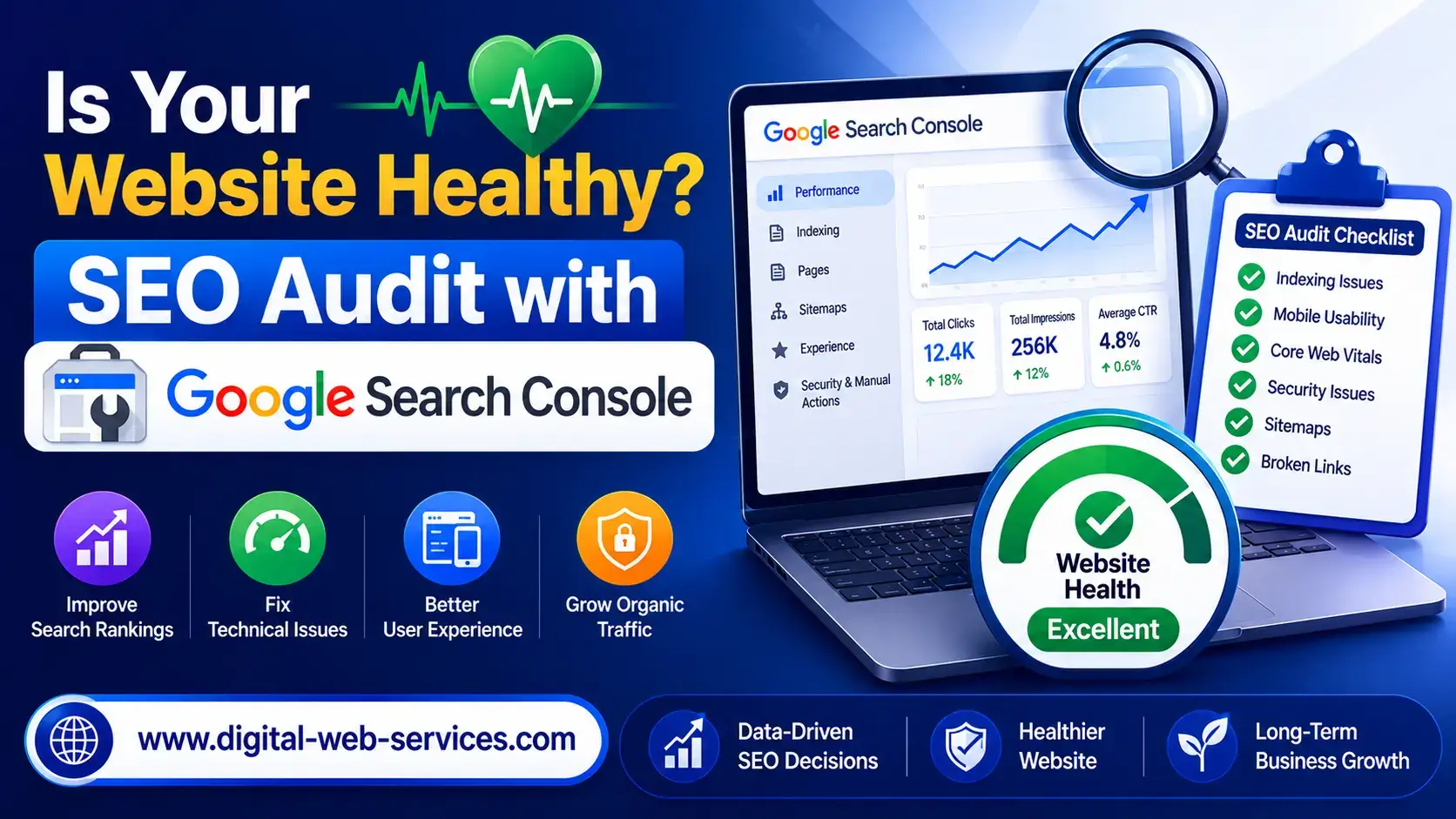
Small technical errors can have big consequences for your online success. A website health check uncovers problems before they hurt your bottom line. It’s better to monitor proactively than to scramble to fix issues after traffic drops.
The good news? You don’t need to hire an expensive SEO consultant or buy premium software. Google Search Console offers professional-level search performance analysis for free. This powerful SEO audit tool gives you direct diagnostic insights from the source.
This guide will empower you to master website auditing yourself. You’ll learn to spot indexing problems, fix usability issues, and boost your organic rankings with confidence.
What is Google Search Console
Google Search Console is a free SEO tool that lets you see how Google interacts with your website. It’s Google’s official service for website owners to monitor and fix their site’s Google Search presence. It’s like having a direct line to the world’s biggest search engine.
This platform is a detailed search analytics platform that shows which search queries bring visitors to your site. You can see how your pages perform in search results and if Google has any issues crawling or indexing your content. This website monitoring gives you insights that no other tool can match.
You don’t need Google Search Console for your site to show up in search results. Google will find and index your site automatically. But using this tool helps you understand and improve how Google sees your website, giving you control over your search presence.
Many people know this platform as Google Webmaster Tools. Google changed the name to better reflect its expanded functionality and user base. The name change shows a shift from serving only webmasters to helping anyone who manages a website.
Google Search Console is different from Google Analytics. While Analytics tracks user behavior after visitors arrive, Search Console focuses on search performance and technical health. It shows you the before picture—how people find you through search and if technical issues prevent Google from accessing your content.
The data comes directly from Google’s crawler, making it the most authoritative source for understanding search performance. No third-party tool can replicate this information with the same accuracy because Google Search Console pulls data straight from Google’s own systems. This makes it an essential free SEO tool for anyone serious about improving their website’s visibility.
Who is This For?
Google Search Console offers insights to boost your online presence. It’s useful for both simple health checks and detailed SEO analysis. Let’s see how different professionals use GSC to meet their needs.
SEO Specialist
SEO specialists rely on Google Search Console for their work. It’s essential for those at an seo agency in bali or worldwide. The platform offers technical SEO analysis and tracks algorithm updates.
Digital marketing professionals use GSC to find indexing issues early. It shows which pages Google can or can’t crawl. This helps identify technical barriers to rankings.
The search performance metrics in GSC show progress clearly. Specialists can present Google’s data on keyword rankings and click-through rates. This transparency helps justify optimization efforts.
Advanced practitioners find new keyword opportunities through search query data. GSC reveals the search terms users type before visiting your site. This helps optimize existing pages for more traffic.
Blogger
Bloggers discover unexpected keywords their content ranks for. This is a chance to expand articles or create new ones. The platform shows your average position in search results, helping identify content that could rank higher.
Content performance tracking reveals posts with high impressions but low clicks. This indicates poor titles that fail to attract attention. The tool also highlights mobile usability issues that cause readers to bounce back to search results.
For bloggers, GSC shows which topics resonate with searchers. You’ll see patterns in the queries bringing traffic, revealing content gaps your audience wants filled. This data-driven approach to organic traffic growth replaces guesswork with concrete evidence about reader interests and search visibility opportunities.
Small Business Website
Small website owners often lack IT staff or marketing teams. Google Search Console is a free resource for maintaining their online presence. It bridges the knowledge gap with straightforward health monitoring and actionable alerts.
The tool helps small businesses monitor their visibility in local search optimization results. You can verify your contact information and business hours display correctly in search. GSC sends email alerts for site issues, allowing quick responses to avoid revenue loss.
Business visibility depends on avoiding errors that drive customers away. GSC identifies broken pages, slow-loading content, and mobile usability problems. It shows which products or services attract the most search interest, helping business owners understand customer priorities.
Freelancer
Freelancers maintaining portfolio websites, service pages, or professional blogs need Google Search Console. It ensures clients can discover their expertise through search. Independent professionals across industries likes writers, designers, developers, or consultants its rely on organic search to generate leads.
The tool helps freelancers understand which aspects of their expertise attract the most search interest. This knowledge allows you to refine service descriptions and content strategy based on actual demand. Portfolio site optimization becomes data-driven when you see exactly how prospects find your work and which case studies generate the most qualified traffic.
Practical applications specific to freelancer needs include ensuring your contact page is properly indexed. GSC monitors whether your portfolio loads quickly on mobile devices—critical when prospects browse on phones during commute or between meetings. The tool identifies which blog posts or case studies drive client acquisition by showing the search paths that lead to contact form submissions.
How to Use The Free Google Search Console Audit Tool
Ready to see what Google sees when it crawls your website? Setting up Google Search Console is your first step. It shows your site’s true health. The entire audit process is free and doesn’t require coding skills.
Let’s walk through the complete GSC setup guide step by step.
Create Your Google Search Console Account
Visit the Google Search Console homepage and sign in with your Google account. If you don’t have a Google account yet, create one. It takes just a couple of minutes.
Once logged in, click the “Add Property” button in the top-left corner. You’ll see two options: Domain property or URL prefix property.
Domain property covers all variations of your website (http, https, www, non-www). URL prefix property tracks only the specific URL version you enter. Most website owners choose the domain property option for complete coverage.
Complete Website Verification
Google needs to confirm you own the website before sharing sensitive data. The website verification process offers several methods to prove ownership.
The HTML file upload method involves downloading a verification file and uploading it to your website’s root directory. This works well if you have FTP access to your server.
DNS verification requires adding a TXT record to your domain’s DNS settings. This method is perfect for tech-savvy users who manage their own hosting.
Google Analytics connection is the easiest option if you already have Analytics installed. Simply link your existing Analytics account to verify ownership instantly.
Google Tag Manager provides another quick verification route for websites already using GTM for tracking. Choose the method that matches your technical comfort level.
Step One: Check the Coverage Report
After verification completes, navigate to the Coverage section in the left sidebar. This report shows which pages Google has successfully indexed and which ones have issues.
The audit process begins here because indexing problems prevent your pages from appearing in search results. Look for pages marked as “Error” in red—these need immediate attention.
Common errors include “Submitted URL not found” (404 errors) and “Redirect error.” Fix these first before addressing warnings. Pages marked “Valid” in green are properly indexed and ready to rank.
Step Two: Review Performance Monitoring Data
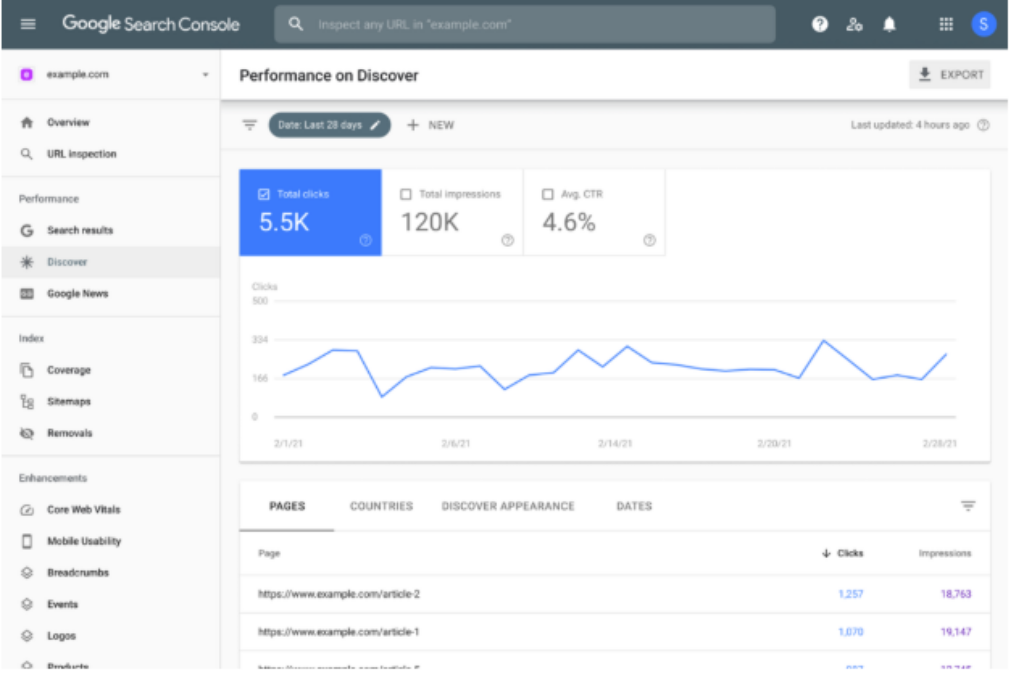
Click on “Performance” in the left menu to access your search analytics. This section reveals exactly how people find your website through Google Search.
You’ll see four key metrics: total clicks, total impressions, average click-through rate (CTR), and average position. Clicks show how many times people visited your site from search results.
Impressions indicate how often your pages appeared in search results. Average position tells you where your site typically ranks for search queries.
Use the date range selector to compare different time periods. Check performance monitoring data weekly to spot trends early. Filter by specific pages or queries to identify your best and worst performers.
Step Three: Examine Mobile Usability
Mobile devices generate over 60% of web traffic today. The Mobile Usability report identifies problems that frustrate mobile visitors.
Common issues include text that’s too small to read, clickable elements placed too close together, and content wider than the screen. Google penalizes sites with poor mobile experiences in search rankings.
This report highlights specific pages with mobile problems. Click any issue to see which pages are affected and get suggestions for fixes.
Step Four: Analyze Core Web Vitals
Core Web Vitals measure user experience through three specific metrics: Largest Contentful Paint (LCP), First Input Delay (FID), and Cumulative Layout Shift (CLS).
LCP measures loading performance. Your pages should load main content within 2.5 seconds for a good rating.
FID tracks interactivity—how quickly your site responds when users click buttons or links. Aim for responses under 100 milliseconds.
CLS evaluates visual stability by measuring unexpected layout shifts while pages load. Lower scores are better, with 0.1 or less being ideal.
Pages marked “Poor” need optimization work. Focus on these pages because Core Web Vitals directly impact your search rankings.
Step Five: Investigate Security and Manual Actions
Check the Security & Manual Actions section to ensure your site has no security vulnerabilities. Hacked sites or those with malware get removed from search results quickly.
Manual actions occur when Google’s human reviewers find your site violating their webmaster guidelines. Common violations include unnatural links, thin content, or cloaking.
A clean report here means your site follows Google’s rules. If you see warnings, address them immediately to avoid ranking penalties.
Practical Tips for Ongoing Audits
How often should you run this audit process? Active sites publishing new content regularly benefit from weekly checks. Stable sites with infrequent updates can audit monthly.
Always prioritize fixing errors before warnings. Errors actively harm your search visibility, while warnings simply indicate possible improvements.
Export your data regularly for record-keeping. Click the export button in any report to download CSV files. This helps track progress over time and provides valuable documentation for client reports.
The beauty of this GSC setup guide is that everything remains completely free. You never need to pay for premium versions or worry about subscription fees. Google provides this powerful audit tool at no cost to help website owners succeed.
Remember, conducting regular audits through Google Search Console requires no technical coding knowledge. Just systematic attention to what the data reveals about your site’s health and performance.
Why Use Google Search Console Tool?
Google Search Console is unique because it offers direct Google insights from the source. It stands out among many SEO tools by giving you real data from Google’s systems. This data shows how Google views your website.
Using GSC is free, which is a big plus. You get unlimited access to free SEO analysis without any costs. This is unlike other platforms that charge a lot for similar features.
GSC shows you the exact search queries that lead to your site. Other tools guess this based on keyword data. But GSC gives you the real search terms people use.
Only GSC sends you official alerts about important issues. You’ll get notifications about manual actions, security, and indexing problems. No other tool can match this for site health info.
Some might find GSC’s interface simple compared to other tools. But this simplicity is a strength. It focuses on the data that really matters for your search visibility.
Using Google Search Console doesn’t mean you have to give up other SEO tools. Think of GSC as your foundation. Other tools can add to the insights you get from GSC.
Ignoring Google Search Console means missing out on key data. Your search performance tracking won’t be complete without Google’s data. While other tools offer valuable insights, none can match Google’s view of your site’s health.
Google Search Console gives you the complete picture of how Google interacts with your site. This direct connection makes it essential for anyone serious about search visibility and website health.
Benefits of Checking Your Website Health Using GSC
Regular website health checks with Google Search Console lead to real business gains. These checks do more than just watch your site; they make it better and easier for visitors.
Technical health monitoring is your first defense against issues that harm your visibility. It spots crawl errors early, preventing pages from being lost in search results. Mobile usability problems are caught right away, ensuring your site works well on phones and tablets.
Tracking Core Web Vitals ensures your site loads quickly, which both users and search engines like. This makes improving user experience a matter of fact, not guesswork, by pinpointing technical issues.
Seeing traffic and visibility boosts is exciting for most site owners. You learn which keywords bring visitors, opening up new optimization chances. Pages with lots of impressions but few clicks show where better titles and descriptions can help.
Position tracking shows if your efforts pay off. You see how changes lead to better rankings in search results. This turns random fixes into smart improvements.
Strategic planning gets better with real search data. Knowing what topics draw interest helps shape your content strategy. Seasonal patterns guide you to publish when interest is highest.
Comparing site sections shows which content types your audience likes best. This stops you from guessing what to create next. Instead, you focus on content that’s already in demand.
Keeping your site safe is another big plus. Alerts for security issues protect your site and visitors from malware. Manual action warnings give you a heads-up on Google penalties before they hurt your traffic.
Monitoring indexing status means your new content shows up in search results fast. Catching technical issues early makes fixes simple, not major repairs.
Final Thoughts
Adding website health checks to your routine changes how you handle SEO. Google Search Console offers direct insights. It helps you avoid conflicting advice and keep up with algorithm changes.
Make a set time for regular checks. Check your site every Monday or the first day of each month. This habit stops big problems before they hurt your rankings.
You don’t need to spend a lot on consultants or use complicated tools to understand your site. Google gives you everything for free. It’s great for both beginners and experts.
Your search visibility strategy relies on knowing what Google sees when it crawls your site. Spending a few minutes each week keeps your site healthy and your traffic growing. This effort leads to better rankings and more visitors.
Start this habit now. Your website needs regular care. Google Search Console makes top-level SEO available to everyone with a website.
Learn More
How often should I check Google Search Console?
For active websites, checking GSC weekly is best. This keeps you informed without feeling overwhelmed. If your site is less active, monthly checks are enough.Always check GSC when you notice traffic drops or make big changes. Setting up email alerts helps you stay on top of important issues. This way, you can monitor your site regularly.
Should I hire an AEO consultant or can I manage SEO audits myself?
Most website owners can manage basic SEO audits themselves using Google Search Console. It provides all the essential data for identifying and fixing common issues. The tool’s interface is designed for self-service.Professional help might be needed for complex issues or if you lack time to learn SEO. Even with a consultant, keeping your own GSC access ensures you can monitor progress and understand your site’s health.
How do I verify my website in Google Search Console?
Verifying your website in Google Search Console is easy. You can use several methods, depending on your comfort level. The most common is uploading an HTML file.You can also use HTML tag verification or connect through Google Analytics or Google Tag Manager. GSC provides step-by-step instructions for each method. Verification is a one-time process that stays active as long as the method is in place.
What should I do if Google Search Console shows errors on my site?
Start by prioritizing errors based on their impact. Focus on errors affecting many pages or critical content. Click on each error type to see which pages are affected and read Google’s explanation.Common errors include 404 errors, broken redirects, and server errors. Determine whether to fix the issue or remove problematic URLs from your sitemap. After fixing, use the “Validate Fix” button to ask Google to re-crawl the pages.
Can I use Google Search Console for multiple websites?
Yes, you can manage multiple websites in one Google Search Console account. This is great for SEO specialists, agencies, and freelancers. You can add each website as a separate property.This is useful for managing client websites or multiple domains. Each website’s data is separate, and you can switch between properties easily. You can also grant different access levels to team members or clients.
How long does it take to see results after fixing issues found in Google Search Console?
The time it takes to see results varies depending on the issue and your site’s characteristics. Technical fixes like resolving crawl errors or improving mobile usability may show impact within days.Improvements in rankings and organic traffic take longer, often several weeks to a few months. Factors like crawl frequency, issue severity, and competitive dynamics affect the timeline. Content optimizations can show results more quickly, sometimes within days.

Maria Jain is a Senior Content Strategist and Tech Editor at Digital Web Services, with over 6+ years of experience covering digital marketing, website development, and search engine optimization. She specializes in WordPress site architecture, AI technologies, Web Hosting, topical authority models, and hands-on SaaS & affiliate tool reviews. Maria combines data-driven SEO practices with deep web design and technical insights to publish transparent guides, tool comparisons, and strategic tutorials for digital growth.